Group-buy tool access: the licensing and account-risk guide
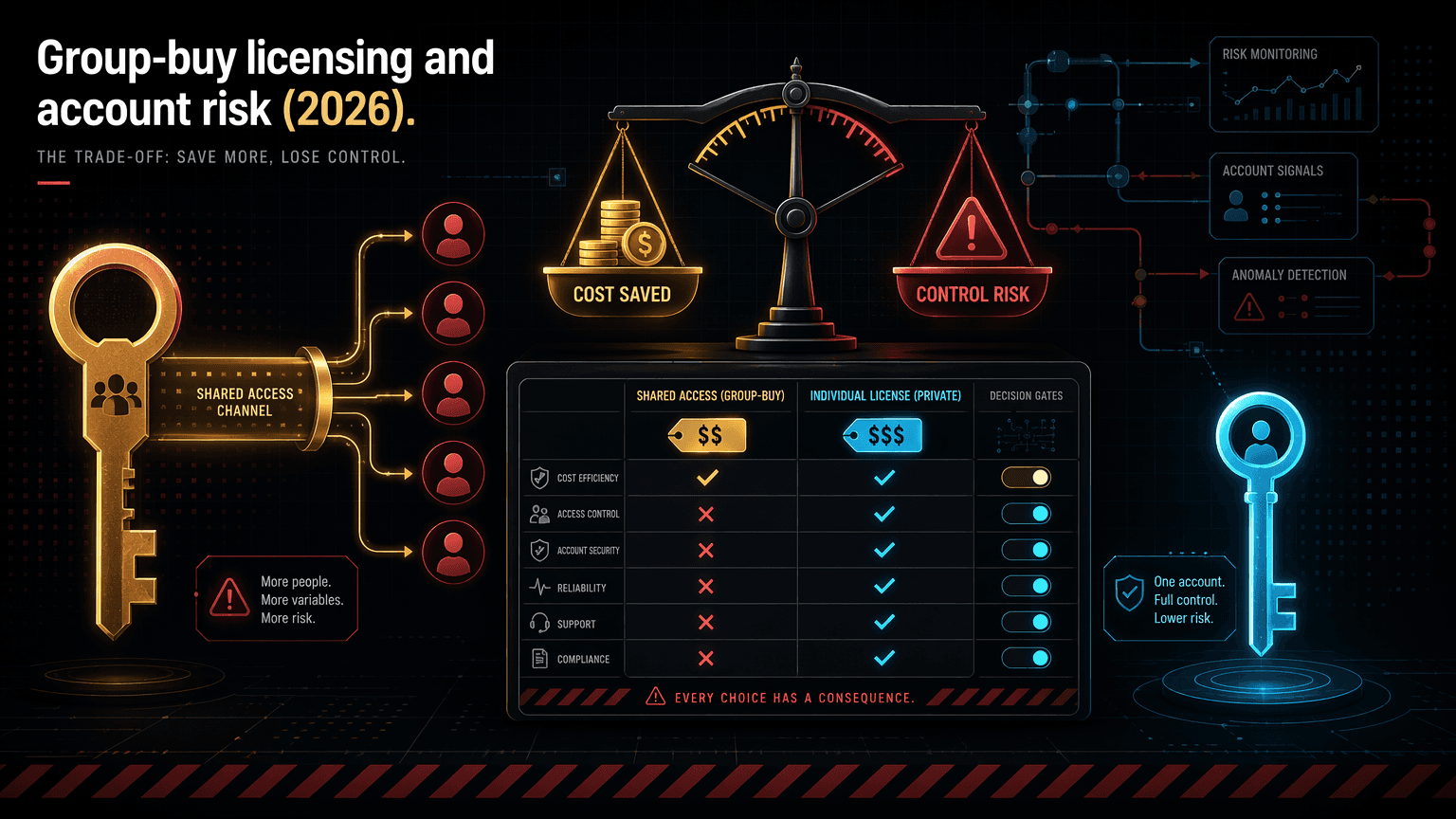
Group-buy access is shared credentials, not your own account. Here is exactly what that is, what it is not, and the real licensing and account risks in 2026.
Group-buy access is shared credentials delivered through Discord, not a subscription in your name. Here is exactly what that is, what it is not, and every real risk before you rent instead of own.
By Maxime Yao, research editor | Published 2026-07-17
You pay $29.99, you open Discord, you get access to a pile of premium tools that would cost hundreds direct. It works on day one. And somewhere in the back of your head a comfortable thought settles in: this is basically my account now. Same tools, same login screen, same features, just cheaper. You start treating it like it is yours. You save projects to it. You build a workflow on it. Maybe you cancel the direct subscription you were paying for.
That thought is the expensive one. Because shared group-buy access is not the same as owning your own account, and the day the difference bites, it bites hard: a login stops working mid-task, a session gets bumped, a tool drops off the list, or a vendor tightens the screws and access to one tool pauses for everyone at once. None of that is hidden fraud. It is the structure of the thing you bought, and almost nobody reads the structure before they buy. So let us read it. What group-buy access actually is, what it is not, and how to use it without getting hurt.
- The lie: "shared group-buy access is the same as owning my own account." It is not. It is rented access to a login someone else controls.
- What it is: one operator buys the real subscriptions, then delivers shared access to many members through Discord for one flat fee. Ecom Tools does this for 16+ tools at $29.99 a month.
- What it is not: a subscription in your name, a private account, a first-party support line, or a licensing arrangement the original vendor sold you.
- The honest risk framing: you are trading roughly 8x cost savings for four structural risks: the operator can change access, sessions can be limited, access can be removed suddenly, and shared use sits in a terms-of-service grey zone with the original vendors.
- The rule: test on the Pro plan, keep mission-critical tools direct, and never build an irreplaceable process on a login you do not control.
What group-buy access actually is
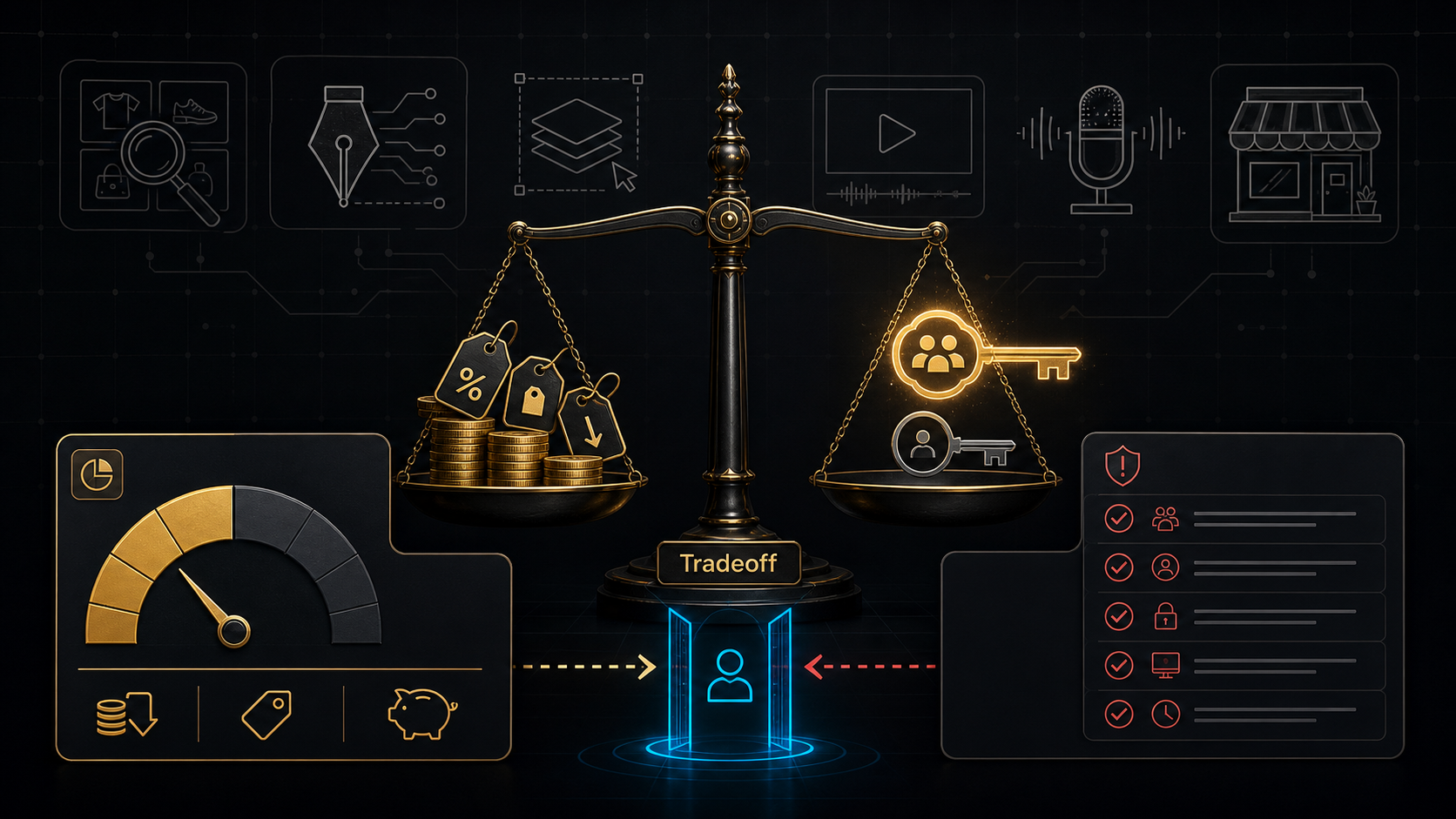
Strip the marketing off and the model is simple. One operator buys genuine, full-price subscriptions to a set of paid tools. PipiAds, ShopHunter, Canva Pro, ChatGPT Plus, Claude Pro, CapCut Pro, ElevenLabs, KaloData, and so on. Then, instead of one person using each subscription, the operator shares access to it across many paying members. Everyone chips in a small monthly fee. Everyone reaches the same tools. The provider handles the billing with the vendors, the uptime, and the replacement when an account gets flagged. You just log in and work. Industry write-ups describe the concept as splitting a Netflix plan with flatmates, applied to professional software (SEOshope, Toolsurf, iBeam Consulting group-buy guides, 2026).
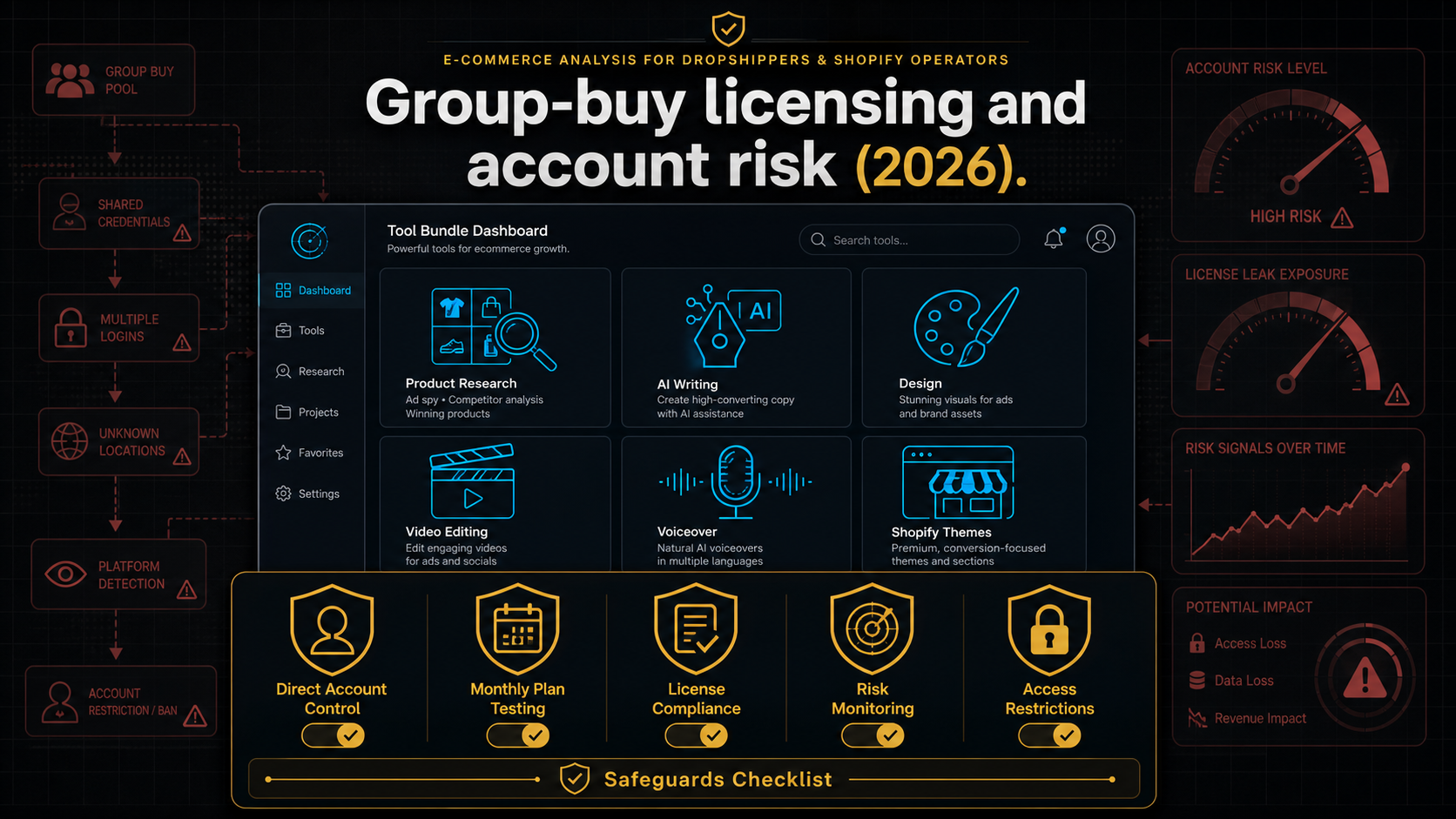
The delivery mechanism matters, because it is where ownership quietly disappears. With Ecom Tools, you buy one Whop subscription and the tool access is delivered through a members-only Discord. That is the plain fact from the operator's own model: a group-buy, shared-credential bundle where one Whop subscription grants Discord-delivered shared access to the paid tools. In practice, group-buy providers deliver access one of a few ways: a shared login handed out in the members area, a browser extension that injects a logged-in session so you never see the password, or a dashboard that opens each tool pre-authenticated. The common thread across all of them is the part that matters: the credential belongs to the operator, not to you.
So here is the honest one-sentence definition. Group-buy access is rented, shared entry to subscriptions that a third party owns and controls, delivered to you through a channel like Discord, for a fraction of the direct price. Hold onto "rented," "shared," and "controls." Those three words are the entire risk profile, and the rest of this guide is just them, spelled out.
The lie: shared access is the same as owning my account
The belief is seductive because on the surface, day one, it looks true. You reach the same tool. You see the same interface. You get the same features a direct subscriber gets. If it walks like your account and quacks like your account, the brain files it as your account. And then you start making decisions as if you own it.
That is where the false belief costs money. Because ownership is not about what the login screen looks like. It is about who controls the credential, whose name the subscription is in, who the vendor supports, and who decides when your access ends. On every one of those, the answer is the same, and it is not you. You do not hold the password. The subscription is in the operator's name, not yours. The vendor's support desk has never heard of you. And the operator, or the vendor above the operator, decides when the access stops, not you. "Same tool" is true. "Same account" is the lie, and it is the one this guide exists to kill.
The tell that you have swallowed the lie is behavioural. You cancel your own direct subscription because "I have it in the bundle now." You save your only copy of a cloned brand voice inside a shared ElevenLabs login. You build a client deliverable pipeline that runs entirely through one shared account. Each of those is a bet that shared access behaves like owned access. It does not, and the next section is the exact list of ways it does not.
What shared access is not, spelled out
Four things you get by owning an account, and do not get by renting shared access to one. This is the fix: not a vibe, a list you can check your own behaviour against.
| Owning your own account gives you | Shared group-buy access gives you instead |
|---|---|
| The credential. You hold the email and password. You control logins, resets, and 2FA. | The operator holds the credential. You reach the tool through access they maintain and can change. |
| The subscription in your name. A direct billing relationship with the vendor. | The subscription is in the operator's name. You have no relationship with the vendor at all. |
| First-party vendor support. When it breaks, the company that built it fixes it, for you. | Your support line is the operator, who relays or replaces access. The vendor will not help you. |
| Private, persistent, portable data. Your projects, history, and saved work are yours and only yours. | A shared environment. Your saved work is not truly private, not guaranteed to persist, and not portable. |
| Uncontested licensing. You are a normal paying customer inside the vendor's terms. | Grey-zone access the vendor did not sell you. Some tolerate sharing, some do not. |
Read the right-hand column as a single thing, because it is one thing: you are a guest in someone else's subscription. A welcome, paying, legitimate guest. But a guest. And a guest does not get to decide when the locks change. That is not a scam. It is the definition of the product, and it is exactly why the product costs $29.99 instead of the $245 or so the same tools run bought direct, a gap laid out in full in the Ecom Tools versus buying separately breakdown.
What you gain: the honest upside
A risk guide that only lists risks is propaganda in the other direction. The savings are real, and for the right buyer they are the entire point. So here is the upside, stated as plainly as the downside.
- Cost, and it is not close. The named tools in the Ecom Tools bundle bought direct at entry tiers run about $245 a month at retail (illustrative, based on published retail prices; verify current pricing). The bundle is $29.99. That is roughly one-eighth the price for the same named tools.
- Breadth to experiment. One fee opens 16+ tools. You can test PipiAds, ShopHunter, KaloData, and the AI models without committing to eight separate subscriptions to find out which two you actually use. For a full inventory, see what is included in Ecom Tools.
- Someone else handles the plumbing. The operator pays the vendors, keeps the accounts alive, and replaces access when something gets flagged. You do not manage eight renewals or eight billing failures.
- Fast support, per the reviews. Ecom Tools carries 4.8 stars from 182 verified Whop reviews, 92% five-star, across 7,887 joined, and the recurring praise is response speed. For a group-buy, where hiccups are structural, fast operator support is the single most valuable thing on offer.
That is a genuinely good deal for wide, cheap experimentation. The mistake is not buying it. The mistake is forgetting that every one of those upsides is delivered through shared access you do not control, which means the upsides and the risks are the same coin. You cannot keep one side and discard the other.
The real risks, named
Four structural risks. Not scare stories. The actual, documented mechanics of how shared access can fail you, drawn from how group-buy models work in practice (BlackHatWorld provider threads; Toolsurf and iBeam group-buy guides, 2026).
1. The operator can change access
The catalogue is a moving target. Vendor deals shift, prices change, a tool gets swapped for a cheaper equivalent, or a login gets rotated. The 16+ tool count is the operator's current number, not a contract. The specific tool you joined for can change form, change access method, or leave the bundle entirely, and you find out when you open Discord, not before. When you own the account direct, the tool is there because you pay for it. In a bundle, the tool is there because the operator's arrangement still holds.
2. Sessions can be limited
Shared accounts have finite capacity. To keep a single subscription alive across many members, providers commonly enforce fair-use controls: concurrent-session caps, rate limits, and no-VPN rules that stop one member from burning the shared account's quota and getting it flagged (Toolsurf, SEOshope group-buy guides, 2026). In practice that can mean a login bumping you at peak times, a tool throttling under shared load, or a session dropping mid-task because too many people are on it. Your own account has no such ceiling. A shared one does, by design, because the sharing is the product.
3. Access can be removed suddenly
Vendors actively hunt shared accounts. When a tool company detects one subscription driving usage from many different IPs, it can flag or ban that account. When that happens, everyone on it loses access until the operator sets up a replacement, which serious providers do quickly, often within a day, but not always instantly (BlackHatWorld provider threads; iBeam Consulting, 2026). The failure is not gradual. A working tool goes dark with no notice, for a reason that has nothing to do with you and everything to do with the vendor above your operator. If your workflow cannot survive a tool vanishing for a day, shared access is a fragile place to put it.
4. It sits in a terms-of-service grey zone
This is the licensing risk, and it deserves precise language, not fear. Buying group-buy access is not a criminal act, and there are no widely known cases of an end user being sued for using one (iBeam Consulting; BlackHatWorld, 2026). But account sharing violates the terms of service of most of the tools involved. Vendors write strict anti-sharing clauses and enforce them, usually against the shared account, sometimes against the provider. It is a civil, terms-of-service grey zone, not piracy. What that means for you as a member: your access depends on an arrangement the tool's owner did not sell you and may not permit, so it can be interrupted when a vendor decides to enforce. You carry that risk indirectly, through the reliability of your access, even though the legal exposure lands mostly on the provider. The broader pattern of what to watch for is covered in the red flags in ecommerce tool bundles guide.
Notice what none of these four require: bad faith from the operator. A completely honest, fast-responding, well-run group-buy still carries all four risks, because they come from the structure of shared access, not from the character of the person selling it. That is why they cannot be reviewed away. They can only be managed.
How to reduce the risk
You cannot remove structural risk. You can size it, contain it, and keep it away from the parts of your business that cannot absorb a bad day. Here is the discipline.
- Test on the Pro plan first. Start on the $29.99 monthly Pro plan, not the $499 lifetime, before you trust the bundle with anything real. Current verified facts do not show a Pro plan. Use the free Access pass to look around first, then verify the paid plan at checkout. A month of low-stakes use tells you more than any review, including this one.
- Keep mission-critical tools direct. If a tool going dark for a day would cost you money or a client deliverable, buy that specific tool direct, in your name, and use the bundle for everything else. Ownership on your one or two load-bearing tools is worth the $20 to $50 a month it costs. Shared access is for the long tail, not the spine.
- Never store your only copy inside a shared login. Export your work. Keep backlink lists, keyword reports, cloned voices, and saved projects somewhere you own. Practitioners who rely on group-buys export regularly precisely because access can vanish (iBeam Consulting, 2026). Treat the shared account as a workspace, never a vault.
- Do not put client data in a shared account. You cannot verify what a shared environment logs or who else can see it. Sensitive client work belongs in an account you control, full stop. This is the one line most group-buy guides draw hardest, and they are right to.
- Do not cancel a direct subscription until the bundle proves itself. Run them in parallel for a full billing cycle on the tool that matters most. If the shared access holds at your real volume, then decide. Cancelling first is betting on shared access before you have any evidence it behaves like owned access.
- Confirm the live catalogue at checkout. Read the current tool list at purchase and confirm the specific tools you came for are in it today, not in a list from months ago, including this one.
Run that list and the four risks shrink from dealbreakers to manageable trade-offs. Ignore it, build your business on a single shared login, and you have volunteered for every one of them at full strength.
Who it suits, and who should buy direct
The honest answer is a split, and which side you land on depends on what you are protecting.
| Group-buy access suits you if | Buy direct if |
|---|---|
| You are a beginner testing which tools you even need, with no live operation to protect yet | You depend on one specific tool and a paused login would break your day |
| You use many tool categories occasionally and want breadth for one cheap fee | You need the account in your own name with private, portable, persistent data |
| You can treat every shared login as disposable and back your work up elsewhere | You handle client data or run deliverables that cannot touch a shared environment |
| You accept that access can change, throttle, or pause as the price of 8x savings | First-party vendor support and zero licensing risk are non-negotiable for you |
Most operators are not purely one column. The common, sensible setup is a hybrid: the bundle for breadth and experimentation, direct subscriptions for the one or two tools the business cannot afford to have pause. That way the shared-access risk lives only on the tools where a bad day is survivable, and never on the spine.
What real members say
Treat these as evidence from the Whop review page, not promises. The listing carries 4.8 stars from 182 verified reviews, 92% of them five-star, across 7,887 joined.
"The variety of tools available here on ecom-tools is unbelievable & no other tool provider is giving such fine services & customer support" Zain Khan (@zain60912)
"Great selection of tools and fastest support I have ever seen" Somira (@somiraa)
"Very convenient and helpful, they got the best and fastest support" Milad Massalha (@massalha)
The recurring word is support, and for a group-buy that is the metric to stress-test. When shared access hiccups, and structurally it will at some point, operator response speed is the difference between an afternoon lost and a week lost. Fast support does not convert shared access into owned access. It just makes the shared version far less painful when the structure does what shared structures do.
Where to be careful before you buy
The caveats are the honest core of this deal. A buyer who reads them and still buys is a buyer who will not leave an angry review, because nothing here will surprise them.
- Shared access, not ownership. The whole trade. You are renting entry to accounts the operator maintains, not buying subscriptions in your name. Do not build a critical, irreplaceable process on a single shared login.
- The tool list can change. The 16+ count is the operator's current number and a bundle catalogue moves as vendor deals shift. Verify the live catalogue at checkout, not from any list months old.
- Outcomes vary. Access to 16 tools is not 16 results. The tools are leverage, not a guarantee, and the work stays yours.
- The operator is semi-anonymous. Ecom Tools is run by a founder known in Whop reviews only as "Rony," who joined Whop in July 2023. There is no public surname, bio, or company-entity disclosure. The reviews are strong and specific, but you are trusting a first name and a track record, not a registered corporate vendor.
- Refund terms are not published. The operator does not publish refund terms, so review Whop's current refund policy at checkout before you pay, not after.
FAQ
Is buying group-buy access legal?
Using a group-buy is not a criminal offence, and there are no widely known cases of an end user being sued for it. But account sharing violates the terms of service of most of the tools involved, so it sits in a civil, terms-of-service grey zone rather than being clearly permitted. The legal exposure falls mostly on the provider who shares the account, not the member. Your practical risk is reliability: access that depends on an arrangement a vendor may enforce against can be interrupted.
Can my account get banned?
You do not have an account to ban, the operator does. The risk is that a vendor flags the operator's shared subscription for multi-user access and suspends it, which cuts off everyone on that tool until the operator sets up a replacement. Serious providers restore access quickly, often within a day, but the interruption is real and outside your control. This is why you never put a mission-critical or time-sensitive workflow on shared access alone.
Is shared access really different from my own account?
Yes, on four things that matter: you do not hold the credential, the subscription is not in your name, the vendor will not support you directly, and your saved data lives in a shared environment you do not fully control. The tool looks identical because it is the same tool. The ownership underneath is not the same, and that difference is the entire subject of this guide.
How do I use a group-buy bundle safely?
Test on the Pro plan before you trust it, keep any mission-critical tool as a direct subscription in your own name, never store your only copy of anything inside a shared login, keep client data out of shared accounts entirely, and do not cancel a direct subscription until the bundle has proven itself for a full billing cycle on the tool you depend on most.
Who should skip group-buy access entirely?
Anyone whose business leans on one specific tool with no tolerance for downtime, anyone handling sensitive client data, and anyone who needs the account and its history in their own name for support, portability, or compliance reasons. For those buyers, buy the critical tools direct. You can still run a bundle alongside for the long tail of tools you use occasionally.
The decision filter
Here is the whole thing in one line. If you can treat every shared login as disposable, keep your load-bearing tools direct, and back your work up elsewhere, group-buy access is a cheap, wide, legitimate way to work, and you can start on the Pro plan to test the fit: Ecom Tools Pro, $29.99/month. If you would rather commit once after testing, the Lifetime plan is $499 one-time. But if your business runs on one specific tool that cannot go dark, or you touch client data, buy that tool direct, own it, and keep it off shared access. Shared group-buy access is not the same as owning your own account. Know exactly what you are renting, keep the spine of your business off it, and the savings are yours to keep. For the wider judgment call, read the Ecom Tools worth-it review.